


How to Find LinkedIn Jobs Posted in the Last Hour (and Apply First). The Secret to Applying First on LinkedIn: A Job Seeker’s Hack You Need to Know
If you’re knee-deep in the job search and feel like every time you apply, it’s already too late, I want to share a trick that can completely change the game.
How to Find LinkedIn Job Posted in the Last Hour (and Apply First).
It’s quick.
It’s simple.
And hardly anyone knows about it.
This one tiny change in your approach could land your application in the top pile before recruiters even finish their coffee.
Let’s walk through it.
Why Timing Matters More Than You Think
There’s a very real advantage to being early. When a recruiter posts a job, the first wave of applications often gets the most attention. Why? Because:
-
Recruiters often hire fast when they see strong candidates early on
-
Applicant tracking systems may sort by submission time
-
First impressions stick, especially when a role is urgent
If you’re waiting until the end of the day to job hunt, or you’re relying only on weekly email alerts, you may already be behind.
But what if you could see job listings within an hour of them going live?
You can.
Let me show you how.
A LinkedIn Job Search Shortcut (for Desktop Only)
LinkedIn job search shortcut works on the desktop version of LinkedIn. It does not work on the mobile app, so be sure to sit down at a computer for this.
Here’s your step-by-step guide:
1. Click on the Jobs Tab
Log into LinkedIn and head straight to the “Jobs” tab in the top navigation bar.
2. Type in the Role You Want
Let’s say you’re looking for a Recruiter position. Type that into the search bar.
You can also add a location if needed. (Remote, Houston, New York, etc.)
3. Use the “Date Posted” Filter
Now click the Date Posted filter and select “Past 24 Hours.” This will narrow the listings to only those posted today.
But we’re about to take it even further.
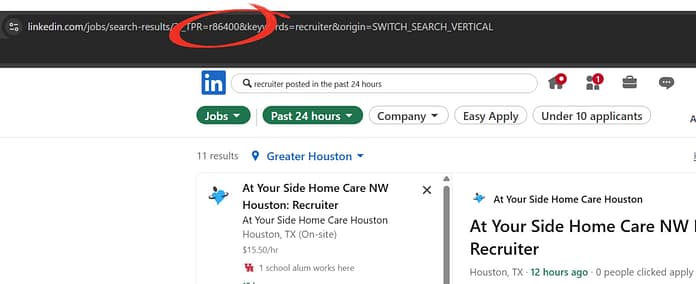
4. Look at the URL in Your Browser
Once your filtered results load, go up to the URL bar at the top of your screen. You’ll see a string of letters and numbers—don’t worry, you don’t need to understand it all.
Just find the part that says:
TPR=r86400
That number represents 24 hours in seconds (24 hours x 60 minutes x 60 seconds = 86,400).
5. Change 86400 to 3600
Now here’s the magic. Replace 86400 with 3600, which is 1 hour in seconds.
The new URL should say:
TPR=r3600
Hit Enter.

6. Watch the Results Refresh
Now you’re seeing job postings from the last hour—not just the last day.
That’s it. You’re in.
You’ve just unlocked a feed of brand-new roles that most job seekers haven’t even seen yet.
Why This Works
LinkedIn’s filters aren’t as customizable as some job seekers would like. They only let you filter by the past 24 hours—not the past 5 minutes, not the past hour.
But the site’s backend uses time stamps based on seconds, and with a little manual tweak, you can get super specific.
When you update the URL with TPR=r3600, you’re telling LinkedIn to show jobs posted in the last 3600 seconds.
LinkedIn listens. And it delivers.
How to Turn This Into a Daily Routine
Want to really stand out?
Do this trick three to four times a day, every day, at different times.
Here’s an example schedule:
-
9:00 AM (morning wave)
-
12:30 PM (lunch postings)
-
3:30 PM (afternoon updates)
-
7:00 PM (evening refresh)
You won’t see a ton of jobs each time—but what you will see are fresh, just-posted listings where you can apply before the crowd.
Even if only a handful show up, remember this: those are the ones that just opened the door. No one else has flooded the inbox yet. You are walking in with a clean slate.
What to Do After You Apply
Okay, so you applied early. That’s great. But your job isn’t done yet.
Now it’s time to make yourself known.
Here’s what to do right after submitting your application:
-
Look up the hiring manager or recruiter on LinkedIn
-
Send a short message introducing yourself (keep it human, not pushy)
-
Mention that you applied and would love to connect
-
If you see a company contact in the job post, send a polite follow-up email too
Remember, people hire people. You’re not just a resume—you’re a real person who took initiative and showed interest before the herd arrived.
A Note for Mobile Users
This trick doesn’t work on the LinkedIn mobile app. If you try it there, the URL won’t be visible or editable.
But there’s still a workaround:
Use your mobile browser (like Safari or Chrome) and switch to desktop mode.
Most mobile browsers have a “Request Desktop Site” option—use that, and you’ll be able to run this same trick from your phone.
Still, the best experience is on a laptop or desktop computer. Make this part of your morning or lunch break routine. It only takes 2 minutes, but the payoff could be huge.
Small Tweaks Can Lead to Big Results
So many job seekers focus on reworking their resume or rewriting their cover letter again and again.
But sometimes, the biggest difference comes from where and when you show up.
This little LinkedIn hack gives you a way to stand out without spending a dime or rewriting a single bullet point.
Try it. Set reminders for it. Make it part of your job search ritual.
Because sometimes being early isn’t just helpful, it’s the edge you need.
Bridget Batson, CMRW, CERM, CGRA, CPRW, NCOPE, CEIP is a Certified Master Resume Writer (CMRW), Certified Executive Resume Master (CERM), Certified Graphic Resume Architect (CGRA), Certified Professional Resume Writer (CPRW), Nationally Certified Online Profile Expert (NCOPE), Certified Employment Interview Professional (CEIP), Myers–Briggs STRONG® Administrator, and Owner of Houston Outplacement. Available for Individual Consultations at Houston Outplacement
 Connect and Follow Bridget on LinkedIn

